Introduction — A Cheap MacBook Air That Looks Tempting
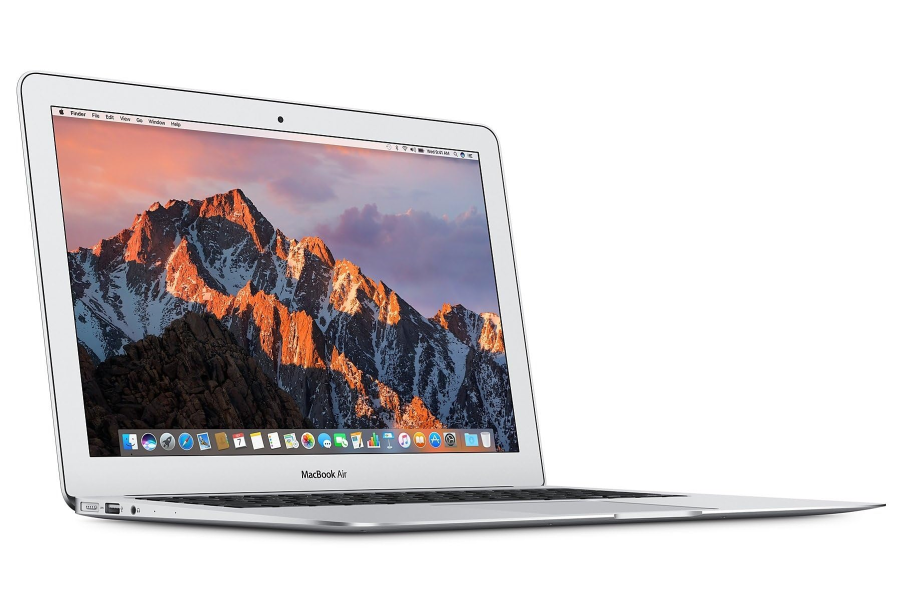
At first glance, the MacBook Air 2017 looks like an excellent deal in 2026. According to the UpTrade Price Tracker, Certified Used / Refurbished MacBook Air 2017 models have dropped to around $190+, making it one of the cheapest MacBooks available today.
For buyers searching for a Used or Refurbished MacBook, that price can be very appealing. The MacBook Air has long been known for its lightweight design, solid battery life, and reliable everyday performance. Even though the 2017 model is older, it still offers a familiar experience for basic tasks like browsing, email, and document work.
On the surface, paying under $200 for a MacBook sounds like a great deal, but we don’t recommend it.
Quick Verdict — Should You Buy the MacBook Air 2017?
Short answer: No, we do not recommend buying the MacBook Air 2017 in 2026.
While the $190+ price for a Certified Used / Refurbished MacBook Air 2017 looks attractive, there are clear reasons why it’s not a good value today:
- It is limited to macOS 12, which is far behind the current macOS 26
- It does not support newer macOS versions
- Its remaining software lifespan is very short
- The hardware is significantly outdated compared to newer models
Instead, we strongly recommend stepping up to a newer MacBook Air:
- MacBook Air 2020 (Intel) — starting around $340+
- MacBook Air 2020 (M1) — starting around $360+
For roughly $150–$170 more, you can get a much newer MacBook with modern performance, longer software support, and a significantly better overall experience.
If possible, we highly recommend the MacBook Air 2020 (M1). It offers a massive upgrade in speed, battery life, and long-term usability, making it one of the best values in the refurbished MacBook market in 2026.
Because of these factors, the MacBook Air 2017 is generally not the refurbished MacBook we recommend buying today.
Performance in 2026
The MacBook Air 2017 can still handle basic everyday tasks in 2026, but its performance is clearly showing its age.
For light usage, it is still usable for:
- Web browsing
- Email
- Google Docs / Microsoft Office
- Video streaming
However, the limitations become obvious as soon as you push it beyond basic tasks.
The MacBook Air 2017 uses an older Intel Core i5 processor with a dual-core design, which struggles with modern workloads. Compared to newer laptops, especially Apple Silicon models, it feels noticeably slower in:
- Multitasking with multiple browser tabs
- Running modern apps
- Video editing or creative software
- Any AI-powered tools or newer applications
Another major drawback is the non-Retina display, which looks outdated compared to the sharper, brighter Retina displays found in newer MacBooks.
In short, while the MacBook Air 2017 still works, it delivers a dated user experience in 2026. For most buyers, especially those planning to keep the laptop for several years, performance will feel increasingly limiting.
Software Support in 2026
The biggest issue with the MacBook Air 2017 is its software support.
Apple’s current operating system is macOS 26, but the MacBook Air 2017 is limited to macOS 12. This means it is several generations behind the latest macOS and no longer part of Apple’s active upgrade cycle.
This has important long-term implications:
- It will not receive any future macOS updates
- Security updates are limited and will eventually stop
- App compatibility will decline over time
- Some newer apps and features may not be available
For buyers considering a Certified Used or Refurbished MacBook, this is a critical factor. Laptops are typically used for many years, and starting with a device that is already multiple versions behind significantly shortens its remaining lifespan.
Over time, you may run into:
- Apps requiring newer macOS versions
- Reduced browser support
- Compatibility issues with newer software
In contrast, newer models like the MacBook Air 2020 (Intel) and especially the MacBook Air 2020 (M1) support macOS 26, giving them a much longer runway for updates and usability.
Because of this, the MacBook Air 2017 is not just an older laptop — it is a device that is already near the end of its software life in 2026, making it a risky purchase even at a low price.
Internet Browser Support — A Hidden but Critical Risk
One important factor that many buyers overlook when purchasing a Used or Refurbished MacBook is internet browser support.
Today, more and more everyday tasks happen directly in the browser. Whether it’s:
- Gmail and Google Docs
- Online banking
- Streaming services
- Web-based apps and tools
Your laptop experience depends heavily on having a fully supported, up-to-date browser.
This is where the MacBook Air 2017 becomes risky in 2026.
For example, Google Chrome, one of the most widely used browsers, now requires macOS 12 or newer. Any MacBook stuck on macOS 11 or older can no longer run Chrome, which severely limits usability.
In those cases, the laptop becomes almost unusable for modern workflows.
While the MacBook Air 2017 can still run macOS 12, it is right at the minimum requirement. This creates a short runway:
- It is already at the lowest supported version for Chrome
- Future Chrome updates may require macOS 13 or newer
- Once that happens, Chrome support will be cut off
When browser support ends, the impact is significant:
- Many websites stop working properly
- Security risks increase due to outdated browsers
- Web apps and modern tools become inaccessible
At that point, even if the laptop still turns on, it becomes impractical for daily use.
This is why browser support is such a critical consideration when buying a refurbished MacBook. The MacBook Air 2017 is already at the edge, and it may lose compatibility in the near future — making it a much riskier investment than it appears based on price alone.
Better Alternatives
While the Certified Used / Refurbished MacBook Air 2017 starting at $190+ looks like a budget-friendly option, spending a little more can dramatically improve your experience.
In 2026, the smarter move is to step up to a MacBook Air 2020 model. These devices offer modern hardware, Retina displays, and — most importantly — support for the latest macOS version.
According to the UpTrade Price Tracker, these newer models are still very affordable:
- MacBook Air 2020 (Intel) — starting around $340+
- MacBook Air 2020 (M1) — starting around $360+
For roughly $150–$170 more, you can get a much newer laptop that will last significantly longer and perform far better.
Specifications Comparison
| Feature |
MacBook Air 2017 |
MacBook Air 2020 (Intel) |
MacBook Air 2020 (M1) |
| Release Year |
2017 |
2020 |
2020 |
| Processor |
Intel Core i5 / i7 (5th Gen) |
Intel Core i3 / i5 / i7 (10th Gen) |
Apple M1 |
| Display |
13-inch (Non-Retina) |
13-inch Retina |
13-inch Retina |
| RAM |
8GB |
8GB – 16GB |
8GB – 16GB |
| Storage |
128GB / 256GB |
256GB – 2TB |
256GB – 2TB |
| Ports |
USB-A, Thunderbolt 2 |
USB-C (Thunderbolt 3) |
USB-C (Thunderbolt / USB 4) |
| Latest macOS Support |
macOS 12 |
macOS 15 |
macOS 26 |
| Starting Used Price |
$190+ |
$340+ |
$360+ |
1st Choice: MacBook Air 2020 (M1)
If you can stretch your budget slightly, the MacBook Air 2020 (M1) is by far the best option — and the one we strongly recommend.
Compared to the MacBook Air 2017, the M1 model delivers a massive leap in every area:
- Significantly faster performance (often several times faster)
- Much longer battery life
- Silent, fanless design with excellent efficiency
- Longer future software support
- Better long-term value and resale potential
At around $360+ in the refurbished market, the MacBook Air M1 offers one of the best price-to-performance ratios of any MacBook available in 2026.
2nd Choice: MacBook Air 2020 (Intel)
If you’re on a tight budget, the MacBook Air 2020 (Intel) is already a major upgrade over the 2017 model.
Key improvements include:
- Supports up to macOS 15 (but not macOS 26), giving it a slightly longer software lifespan
- Retina display, which is significantly sharper than the older non-Retina screen
- Modern USB-C ports, replacing outdated USB-A and Thunderbolt 2
- Newer Intel processors (10th Gen) for better performance
- Better compatibility with modern apps and accessories
For most buyers, this is the minimum recommended upgrade if you want a refurbished MacBook in 2026.
Conclusion — Is the MacBook Air 2017 Worth Buying in 2026?
At first glance, the Certified Used / Refurbished MacBook Air 2017 starting at $190+ looks like a great budget deal. For under $200, you’re getting a lightweight MacBook that can still handle basic tasks like browsing, email, and document work.
However, in 2026, the MacBook Air 2017 is simply too outdated to be a smart purchase.
The biggest issue is software support. The device is limited to macOS 12, which is far behind the current macOS 26. This means it is already near the end of its software lifecycle, with limited future updates and increasing risk of compatibility issues.
Even more importantly, browser support is becoming a real concern. Since modern workflows rely heavily on web browsers, losing support for browsers like Chrome can make a laptop difficult — or even impractical — to use over time.
On top of that, the hardware itself is outdated, with older Intel processors and a non-Retina display that feels noticeably behind newer MacBooks.
The key takeaway is this:
- Yes, $190+ is cheap
- But the MacBook Air 2017 has very limited remaining lifespan
For just $150–$170 more, you can upgrade to a much better device:
If available, we strongly recommend the MacBook Air 2020 (M1). It offers dramatically better performance, longer software support, and a far better overall experience.
FAQ — Buying the MacBook Air 2017 in 2026
1. Is the MacBook Air 2017 still supported in 2026?
Partially. The MacBook Air 2017 is limited to macOS 12 and may still receive some security updates, but it does not support newer macOS versions like macOS 26. This means it is near the end of its software support lifecycle.
2. Is $190 a good price for a refurbished MacBook Air 2017?
Yes, $190+ is a low price, but it comes with significant trade-offs. Because of outdated software support and aging hardware, many buyers will find better long-term value by spending slightly more on a newer MacBook.
3. Is the MacBook Air 2017 too old in 2026?
Yes. In 2026, the MacBook Air 2017 is considered very outdated, especially due to its limited macOS support, older hardware, and lack of modern features like a Retina display.
4. Can the MacBook Air 2017 still run Chrome?
Yes, but with limitations. Chrome currently requires macOS 12 or newer, which the MacBook Air 2017 supports. However, since it cannot upgrade beyond macOS 12, it may lose Chrome support in future updates.
5. What happens if Chrome stops supporting macOS 12?
If Chrome drops support for macOS 12, the MacBook Air 2017 will no longer be able to run the latest version of the browser. This can lead to:
- Security risks
- Websites not loading properly
- Incompatibility with modern web apps
At that point, the laptop becomes much less useful for everyday tasks.
6. What is the best alternative to the MacBook Air 2017?
Two better alternatives are:
The MacBook Air 2020 (M1) is the best choice for most users due to its superior performance and longer software support.
7. Is the MacBook Air 2020 M1 worth the extra money?
Yes. For about $360+, the M1 MacBook Air offers significantly better performance, battery life, and long-term usability, making it one of the best values in the refurbished MacBook market in 2026.
8. Does the MacBook Air 2020 (Intel) support macOS 26?
No. The MacBook Air 2020 (Intel) supports up to macOS 15, but not macOS 26.
9. Why does macOS jump from macOS 15 to macOS 26?
Apple has moved to a year-based naming system for macOS to align with iOS and iPadOS. For example, macOS 26 corresponds to the 2026 generation and was released in late 2025.

 Sale
Sale