Introduction — Is the 2017 MacBook Pro Still a Good Buy in 2026?
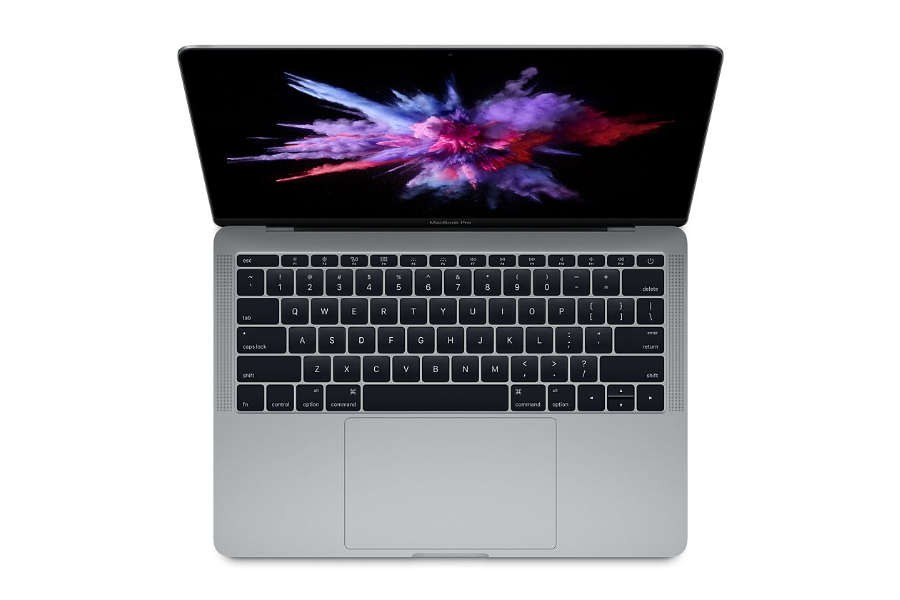
The MacBook Pro 2017 was once a premium device with a sleek design and solid specifications. But fast-forward to 2026, and the landscape has changed dramatically. With macOS updates moving on and known hardware issues resurfacing, the 2017 MacBook Pro has fallen far behind newer models.
While the price may be tempting—especially for shoppers looking to stay under $300—it’s important to look beyond the sticker price. Before buying a Certified Used or Refurbished MacBook Pro 2017, you should consider its aging hardware, lack of software support, and major design flaws that Apple has since abandoned.
Current Price and Availability in 2026
According to UpTrade’s Price Tracker, Certified Used and Refurbished MacBook Pro 2017 models start at around $200+ in 2026. While that may sound like a bargain, it reflects the market’s declining confidence in this model.
Inventory from certified sellers is becoming increasingly scarce, and many remaining units show noticeable cosmetic wear or come with limited warranties. By comparison, the Certified Refurbished MacBook Pro 2020 has dropped to approximately $340+ for the Intel version and $440+ for the M1 version—offering significantly better performance, reliability, and long-term usability for a modest price increase.
macOS 26 Tahoe Support: Officially Dropped
One of the biggest reasons to skip the 2017 MacBook Pro in 2026 is that it no longer supports the latest version of macOS—macOS 26 Tahoe. Apple officially dropped support for this model in 2024, which means it no longer receives major macOS upgrades, new features, or long-term security improvements.
This lack of support also impacts software compatibility. Many modern applications now require newer macOS versions, and without updates, the 2017 MacBook Pro becomes increasingly vulnerable to security risks while struggling to run the latest tools and workflows.
The Butterfly Keyboard Problem: A Major Dealbreaker
One of the most infamous design decisions in Apple’s 2015–2019 MacBook lineup was the butterfly keyboard—and the 2017 MacBook Pro sits squarely in the middle of that troubled era. Apple replaced its traditional scissor-switch keyboard with an ultra-thin butterfly mechanism to reduce thickness, but the result was a typing experience that felt shallow, fragile, and unreliable.
Here’s why the butterfly keyboard is a serious red flag in 2026:
-
High Failure Rate: Dust, crumbs, or minor debris can cause keys to stop responding or register repeated keystrokes, often rendering the keyboard unusable.
-
Expensive Repairs: Fixing a single key usually requires replacing the entire top case, including the battery. Apple’s free keyboard replacement program is winding down, and out-of-pocket repairs in 2026 can easily exceed $300.
-
Poor Typing Experience: Even when functioning properly, the butterfly keyboard was widely criticized for its flat, clicky feel and lack of key travel compared to Apple’s newer Magic Keyboard.
-
Resale and Longevity Issues: The keyboard’s reputation significantly lowers resale value and buyer confidence, which is one of the main reasons refurbished 2017 MacBooks are priced so low.
In short, the keyboard isn’t a minor inconvenience—it’s a fundamental usability and durability issue. Apple abandoned the butterfly mechanism starting with the 2020 MacBook lineup, returning to a more reliable scissor-switch Magic Keyboard. If you’re buying in 2026, choosing a MacBook with this newer keyboard design is strongly recommended.
Performance and Hardware Limitations in 2026
While the 2017 MacBook Pro was capable at launch, it now struggles to meet modern performance expectations. Several hardware limitations make it a poor choice for most users in 2026:
-
Outdated Processors: Most models use 7th-generation Intel Core i5 or i7 processors (Kaby Lake), which lag far behind Apple’s M1, M2, and M3 chips in speed, efficiency, and multitasking.
-
Thermal Throttling: These Intel chips are prone to overheating, causing the system to throttle performance during sustained workloads such as video editing, coding, or heavy multitasking.
-
Battery Degradation: At 7–8 years old, many units suffer from degraded batteries unless replaced, leading to short battery life and unexpected shutdowns.
-
Limited RAM and Storage: Base configurations with 8GB RAM and 128GB or 256GB SSDs are increasingly inadequate. Storage and memory are soldered, eliminating upgrade options.
-
Outdated Connectivity: The 2017 MacBook Pro lacks Wi-Fi 6 and Bluetooth 5.0, which are now standard for faster and more stable wireless connections.
-
No Apple Silicon Optimization: Apple’s software ecosystem is now fully optimized for Apple Silicon, leaving Intel-based Macs behind in performance, battery life, and app compatibility.
-
Poor Resale Value: Due to its aging hardware and keyboard issues, the 2017 MacBook Pro holds value poorly and offers weak trade-in potential.
Comparison — 2017 MacBook Pro vs 2020 MacBook Pro
If you’re deciding between a 2017 MacBook Pro and a newer 2020 model, the differences are substantial—especially in 2026, when the 2020 MacBook Pro regularly sells for around $340+ (Intel version) and $440+ (M1 version) in Certified Used or Refurbished condition.
| Feature |
2017 MacBook Pro (Intel) |
2020 MacBook Pro (Intel) |
2020 MacBook Pro (M1) |
| Processor |
Intel Core i5 / i7 (7th-gen) |
Intel Core i5 / i7 (10th-gen) |
Apple M1 (8-core CPU, 8-core GPU) |
| RAM |
8GB or 16GB DDR3 |
8GB or 16GB LPDDR4X |
8GB or 16GB Unified Memory |
| Storage |
128GB to 1TB SSD |
256GB to 2TB SSD |
256GB to 2TB SSD |
| Keyboard |
Butterfly Keyboard (prone to failure) |
Magic Keyboard (scissor-switch) |
Magic Keyboard (scissor-switch) |
| Display |
13.3" Retina (2560×1600) |
13.3" Retina (2560×1600) |
13.3" Retina (2560×1600) |
| Ports |
2x Thunderbolt 3 (USB-C) |
4x Thunderbolt 3 (USB-C) |
2x Thunderbolt / USB 4 |
| Battery Life |
Up to 10 hrs (real-world ~6–7 hrs) |
Up to 10 hrs (real-world ~7–8 hrs) |
Up to 20 hrs (real-world ~15–17 hrs) |
| macOS Support |
Up to macOS Ventura |
macOS Sequoia (expected final) |
Full support for macOS Sequoia and beyond |
| Weight |
~3.02 lbs (1.37 kg) |
~3.1 lbs (1.4 kg) |
~3.0 lbs (1.4 kg) |
| Starting Price (2026) |
$200+ (Used / Refurbished) |
$340+ (Used / Refurbished) |
$440+ (Used / Refurbished) |
Key Differences That Matter in 2026
-
Processor: The 2017 model uses 7th-gen Intel chips, while the 2020 MacBook Pro (M1) runs on Apple’s first-generation Silicon. The M1 delivers dramatically better performance, battery efficiency, and modern app optimization.
-
Keyboard: The 2017 MacBook Pro uses the unreliable butterfly keyboard. The 2020 models return to Apple’s Magic Keyboard, which is far more durable and comfortable to type on.
-
Battery Life: M1-powered MacBook Pro models offer nearly double the battery life of the 2017 Intel models, even years after release.
-
Thermals and Noise: The 2020 M1 MacBook Pro runs cooler, quieter, and sustains performance better than the thermally constrained 2017 model.
-
macOS Support: The 2020 MacBook Pro supports macOS 26 Tahoe and will receive updates for many years, while the 2017 model is no longer supported.
-
Resale Value: The Apple Silicon foundation allows the 2020 model to retain significantly stronger resale value.
Price Drop of the 2020 MacBook Pro (M1)
Apple released both Intel and Apple Silicon versions of the MacBook Pro in 2020. Initially, the M1 version commanded a much higher price in the Certified Refurbished market due to its superior performance and efficiency.
According to the UpTrade Price Tracker, the Certified Refurbished MacBook Pro 2020 (M1) has dropped from $600+ in 2025 to around $440+ in 2026. If your budget allows, the M1 version is strongly recommended over the Intel variant.
Intel Core i5 vs Intel Core i7 vs Apple M1
| Feature |
Intel Core i5 (MacBook) |
Intel Core i7 (MacBook) |
Apple M1 |
| Architecture |
x86 (Intel) |
x86 (Intel) |
ARM-based (Apple Silicon) |
| Process Technology |
14nm |
14nm |
5nm |
| CPU Cores / Threads |
4 cores / 8 threads |
4–6 cores / 8–12 threads |
8 cores (4 performance + 4 efficiency) |
| GPU |
Intel Iris Plus / Iris Xe |
Intel Iris Plus / Iris Xe |
Integrated 7-core or 8-core Apple GPU |
| Neural Engine |
None |
None |
16-core Neural Engine |
| RAM Type |
DDR4 / LPDDR4X |
DDR4 / LPDDR4X |
Unified Memory (LPDDR4X) |
| Max RAM |
Up to 32GB |
Up to 32GB |
16GB |
| Typical Geekbench 5 |
~900 / ~3,800 |
~1,000 / ~4,800 |
~1,700 / ~7,400 |
| Power Efficiency |
Moderate |
Lower (runs hotter) |
Extremely high |
| Fan Noise |
Frequent under load |
Frequent and louder |
Silent or minimal |
| Battery Life |
7–10 hours |
6–9 hours |
15–20 hours |
| macOS Support Longevity |
Limited |
Limited |
Long-term support expected |
| Apple Intelligence |
❌ No |
❌ No |
✅ Yes |
Key Takeaways for Buyers
- Intel i5 is acceptable for light tasks but shows its age in 2026, especially in battery life and thermals.
- Intel i7 offers more raw performance but runs hotter, louder, and less efficiently.
- Apple M1 is a major leap forward—faster, quieter, cooler, and supported far longer by Apple.
For Certified Used and Refurbished MacBooks, this is why M1 models consistently deliver the best price-to-performance value on UpTrade in 2026.
Conclusion
While the Certified Refurbished MacBook Pro 2017 might seem like a budget-friendly deal at around $200+, the drawbacks are hard to ignore. Outdated performance, failing butterfly keyboards, lack of macOS 26 support, and short battery life make it a poor long-term investment in 2026.
In contrast, the Certified Refurbished MacBook Pro 2020 delivers massive improvements in speed, reliability, and everyday usability. If you’re shopping for a MacBook in 2026, the 2017 model is no longer worth your money—even at a deep discount.
We strongly recommend the MacBook Pro (2020, M1), starting at around $440+, for the best balance of performance and longevity. If your budget is tighter, the MacBook Pro (2020, Intel) starting at approximately $340+ is still a far safer choice than the 2017 model.
FAQ: Buying a 2017 MacBook Pro in 2026
1. How much is a 2017 MacBook Pro worth in 2026?
Certified Used or Refurbished MacBook Pro 2017 units typically start around $200. However, availability is limited, and we do not recommend them due to widespread keyboard failures and lack of support for macOS 26.
2. Does the 2017 MacBook Pro support macOS 26 Tahoe?
No. Apple ended major macOS support for the 2017 MacBook Pro before macOS 26. This means no new features, no long-term security updates, and growing software compatibility issues in 2026.
3. What’s wrong with the butterfly keyboard?
The butterfly keyboard used in 2016–2019 MacBook Pro models is notorious for frequent failures caused by dust and debris. Apple has permanently discontinued this design, and repair costs can be expensive once warranty programs expire.
4. Should I buy any Intel-based MacBook in 2026?
Buying an Intel-based MacBook is generally not recommended unless it’s a 2020 model. Apple Silicon Macs offer better performance, battery life, and significantly longer software support. If your budget allows, Apple Silicon is the smarter choice.
5. Where can I find the best deals on refurbished MacBooks?
Use UpTrade to compare real-time prices from certified resellers like Apple, Amazon, and Best Buy—all in one place. UpTrade helps you find the best Certified Used and Refurbished MacBook deals without the risk of individual sellers.
6. What is a Refurbished MacBook Pro?
A Refurbished MacBook Pro is a pre-owned device that has been professionally inspected, tested, cleaned, and restored to full working condition by certified technicians. These units are often returned due to cosmetic issues, minor defects, or buyer’s remorse and are sold at a discount.
7. Is a Refurbished MacBook Pro reliable?
Yes. When purchased from certified sellers such as Apple, Best Buy, or Amazon Renewed, refurbished MacBook Pros are highly reliable. They undergo strict quality checks and usually include a warranty or return policy for added peace of mind.
8. What’s the difference between “Used” and “Refurbished” MacBook Pro?
Used MacBooks are typically sold as-is by individual sellers, often without inspection or warranty. Refurbished MacBooks are professionally tested, repaired if necessary, cleaned, and resold by certified vendors—making them far more reliable.
9. Do refurbished MacBook Pros come with a warranty?
Most Certified Refurbished MacBook Pros include at least a 90-day warranty. Some sellers, especially Apple, provide a full one-year warranty. Always review the seller’s warranty and return policy before purchasing.
10. Can I update macOS on a refurbished MacBook Pro?
Yes, as long as the model is still supported. For example, a 2020 MacBook Pro (Intel or M1) supports macOS 26 Tahoe and likely future versions, while a 2017 model no longer receives major macOS updates.
11. Is a refurbished MacBook Pro as good as new?
In many cases, yes—especially when it’s Certified Refurbished. These MacBooks undergo rigorous testing, replacement of faulty components if needed, and thorough cleaning. While minor cosmetic wear is possible, performance and reliability are often indistinguishable from new devices at a much lower price.

 Sale
Sale