Is Mac Mini M1 2020 Worth Buying in 2026
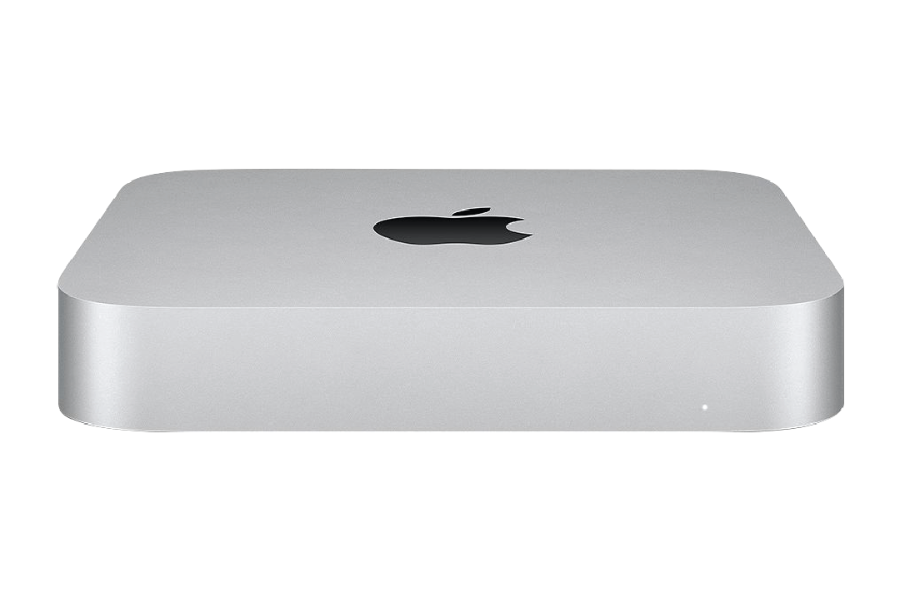
Introduction — Why the Mac Mini M1 (2020) Is a Hot Deal in 2026
In 2026, the Mac mini (M1, 2020) has quietly become one of the best values in Apple’s lineup.
According to the UpTrade Price Tracker, Certified Used / Refurbished M1 Mac mini models have dropped to around $300+, which is nearly half the price of a new one. At that price point, it is also the lowest-priced Mac mini on the market that still supports the latest macOS 26, making it especially attractive for budget-conscious buyers who want long-term software support.
The appeal is easy to understand:
- Apple’s first-generation M1 chip, which still delivers excellent real-world performance
- Full support for the latest macOS (macOS 26)
- Extremely low power consumption and quiet operation
- A compact desktop that works perfectly for home offices, students, and everyday productivity
That combination — modern software support at a very low entry price — is rare in 2026.
Quick Verdict — Is the Mac Mini M1 Worth Buying in 2026?
Short answer: Yes — absolutely, if you can find one around $300.
At that price, the Mac mini M1 is the cheapest Mac mini available in 2026 that supports macOS 26, which alone makes it stand out. You’re getting an Apple Silicon Mac that still receives full security updates, runs the latest macOS, and has enough performance headroom for most users for years to come.
Here’s the quick breakdown:
- ✅ Worth buying at $300–$390
The best entry-level Mac mini that still supports macOS 26. - ⚠️ Supply is limited
Availability fluctuates due to high prior demand. - 🔁 If unavailable, look at alternatives
The Mac mini M2 (2023) at $400+ is the next best choice, or waiting a few weeks may allow refurbished stock to replenish.
In short, the Mac mini M1 isn’t a risky end-of-life purchase. It’s a mid-lifecycle Apple Silicon Mac at a deeply discounted price — and the most affordable way to stay on the latest macOS in 2026.
Limited Supply in 2026 — A Supply vs. Demand Issue
The limited availability of the Mac mini M1 (2020) in 2026 isn’t accidental. It’s the result of both constrained supply and sustained demand.
Supply Side: Why Inventory Is Tight
On the supply side, fewer Mac mini M1 units are entering the refurbished market than many buyers expect.
Several factors contribute to this:
- The previous major sales season significantly dried up inventory, as discounted refurbished units were quickly absorbed by buyers
- Many Mac mini M1 units were originally purchased by businesses, schools, and remote workers, who tend to keep devices longer
- Unlike older Intel Macs, Apple Silicon Macs are aging well, so fewer owners feel pressure to upgrade or resell
As a result, refurbished supply doesn’t flow consistently. Inventory tends to arrive in waves, usually after:
- Corporate refresh cycles
- End-of-quarter hardware upgrades
- Post-sales-season trade-ins
Between those cycles, availability can drop sharply.
Demand Side: Why Buyers Keep Snapping Them Up
At the same time, demand for the Mac mini M1 remains unusually strong in 2026.
The reasons are straightforward:
- It is the lowest-priced Mac mini that supports macOS 26
- It offers Apple Silicon performance at a budget price
- It delivers long-term software support without the cost of buying new
- It’s ideal for home offices, students, and budget-conscious buyers
This combination creates a pricing sweet spot: when Certified Used / Refurbished units are priced around $300–$390, they tend to sell quickly.
What This Means for Buyers
The result of this supply-and-demand imbalance is inconsistent availability:
- Some weeks, refurbished units are easy to find
- Other weeks, listings disappear entirely
- Prices may temporarily rise when inventory is tight
If you’re flexible, waiting a few weeks often allows inventory to replenish. But if you spot a clean, certified Mac mini M1 near $300, it’s usually smart to act quickly — because demand remains high, and supply doesn’t stay available for long.
macOS Software Support & Longevity
The biggest reason the Mac mini M1 (2020) still makes sense in 2026 is software support.
Unlike older Intel-based Mac minis, the Mac mini M1 fully supports macOS 26 and continues to receive:
- Major macOS feature updates
- Ongoing security patches
- Full compatibility with modern apps and frameworks
In Apple’s software lifecycle, this places the Mac mini M1 firmly in the Up-To-Date phase, not in a transitional or end-of-life stage.
Just as important, Apple’s long-term roadmap is now entirely focused on Apple Silicon:
- New macOS versions are optimized first for Apple chips
- Intel Macs are gradually losing support
- Future features increasingly depend on Apple Silicon architecture
Because the Mac mini M1 uses Apple’s own chipset, it is expected to receive significantly longer software support than Intel-based models released around the same time.
In practical terms, this means:
- Strong app compatibility for years
- Continued browser and security updates
- Lower risk of sudden obsolescence
- Better long-term resale value
That’s why, in 2026, the Mac mini M1 stands out as the lowest-priced Mac mini that still supports the latest macOS — and one of the safest refurbished Mac purchases you can make.
Mac Mini (M1, 2020) Ports — What You Get (and What You Don’t)
One of the most common questions buyers ask about the Mac mini M1 (2020) is simple: What ports does it have? The good news is that Apple kept the Mac mini M1 surprisingly well-equipped, especially compared to many modern laptops.
Mac Mini M1 (2020) Port Selection
The Mac mini M1 includes the following ports:
- 2× Thunderbolt / USB 4 ports
- 2× USB-A ports
- 1× HDMI 2.0 port
- 1× Gigabit Ethernet port (10Gb optional on some configurations)
- 1× 3.5mm headphone jack
For most users, this is more than enough for a full desktop setup.
Why the Port Selection Still Works Well in 2026
Despite being released in 2020, the Mac mini M1’s ports have aged well.
Thunderbolt / USB 4
The two Thunderbolt ports support:
- External SSDs
- Docks and hubs
- External displays
- High-speed peripherals
This gives you plenty of flexibility to expand with a single cable.
USB-A Is Still a Big Advantage
Unlike many newer Macs, the Mac mini M1 still includes two USB-A ports, which are extremely useful in 2026 for:
- Older keyboards and mice
- USB flash drives
- Printers and scanners
- Audio interfaces and accessories
This makes the Mac mini M1 especially friendly for users upgrading from older Macs or PCs.
HDMI 2.0 for External Displays
The built-in HDMI port supports:
- 4K displays at 60Hz
- TVs and monitors without adapters
While it’s not HDMI 2.1, it’s perfectly adequate for most home office and media setups.
Ethernet for Stable Networking
A wired Ethernet port is increasingly rare on modern computers. The Mac mini M1 includes it by default, making it ideal for:
- Home offices
- NAS setups
- Stable video calls
- Faster, more reliable internet than Wi-Fi alone
Display Support Considerations
The Mac mini M1 supports:
- One display via Thunderbolt
- One display via HDMI
This means up to two external displays without additional adapters or workarounds.
If you need more than two displays, newer Mac mini models or DisplayLink setups may be required.
Port Limitations to Be Aware Of
To be fair, there are a few limitations:
- Only two Thunderbolt ports (Intel models had four)
- HDMI is 2.0, not 2.1
- No SD card reader
- No front-facing ports
For most everyday users, these aren’t dealbreakers — but power users should be aware.
Performance Still Holds Up in 2026
Despite being released in 2020, the Mac mini M1 continues to deliver surprisingly strong performance in 2026 — especially for the types of workloads most buyers actually care about.
Apple’s first-generation M1 chip marked a major architectural leap, and that efficiency advantage hasn’t disappeared just because newer chips exist. In everyday use, the Mac mini M1 still feels fast, responsive, and stable.
Specs — Mac Mini M1 (2020)
| Feature | Mac Mini M1 (2020) |
|---|---|
| Release Year | 2020 |
| Chipset | Apple M1 |
| CPU | 8-core (4 performance + 4 efficiency cores) |
| GPU | 8-core integrated GPU |
| Neural Engine | 16-core |
| Architecture | Apple Silicon (ARM) |
| RAM | 8GB or 16GB unified memory |
| Storage | SSD (256GB – 2TB options) |
| macOS Support | macOS 26 |
| Security Updates | Yes |
| Power Consumption | Extremely low |
| Noise | Virtually silent |
Why the M1 Still Feels Fast
Several factors help the Mac mini M1 age gracefully:
1. Apple Silicon Efficiency
The M1’s unified memory architecture and high-performance cores allow it to handle everyday tasks faster than many older Intel Macs — even those with higher clock speeds on paper.
2. macOS Optimization
macOS 26 is designed first and foremost for Apple Silicon. Background tasks, system animations, and app launches are noticeably smoother compared to Intel-based Macs.
3. Silent, Consistent Performance
The Mac mini M1 runs cool and quiet, even under sustained load. There’s no aggressive fan noise or thermal throttling that degrades performance over time.
What the Mac Mini M1 Handles Well in 2026
For most users, the Mac mini M1 is more than capable of handling:
- Web browsing with dozens of tabs
- Office productivity (Docs, Excel, email, Slack, Zoom)
- Media consumption and streaming
- Light photo editing (Photoshop, Lightroom)
- Light video editing (1080p and some 4K workflows)
- Coding and development for many non-enterprise use cases
macOS 26 is fully optimized for Apple Silicon, which allows the M1 to punch above what its age might suggest.
Where the Mac Mini M1 Starts to Show Its Limits
To be clear, the Mac mini M1 is not a powerhouse by 2026 standards.
It may struggle with:
- Heavy 4K/8K video editing
- Large-scale data processing
- Advanced 3D rendering
- Workflows requiring more than 16GB of RAM
For those use cases, newer Apple Silicon Macs (M2 Pro, M3, M4) make more sense.
Bottom Line on Performance
In 2026, the Mac mini M1 delivers excellent performance for everyday and moderate workloads. It’s not cutting-edge anymore, but it doesn’t feel outdated either.
That balance — strong real-world speed, low power usage, and full macOS 26 support — is why the Mac mini M1 remains one of the smartest refurbished Mac buys at the $300 price point.
Mac Mini M1 (2020) vs Mac Mini M2 (2023)
If you can’t find a Mac mini M1 at the $300 price point — or you’re deciding whether the M2 is worth spending more — this comparison makes the tradeoffs clear.
Specs Comparison — Mac Mini M1 vs Mac Mini M2
| Feature | Mac Mini M1 (2020) | Mac Mini M2 (2023) |
|---|---|---|
| Release Year | 2020 | 2023 |
| Chipset | Apple M1 | Apple M2 |
| CPU | 8-core (4P + 4E) | 8-core (4P + 4E) |
| GPU | 8-core | 10-core |
| Neural Engine | 16-core | 16-core (faster) |
| Architecture | Apple Silicon (ARM) | Apple Silicon (ARM) |
| RAM | 8GB / 16GB unified | 8GB / 16GB / 24GB unified |
| Storage | SSD (256GB–2TB) | SSD (256GB–2TB) |
| Ports |
2× Thunderbolt / USB 4 2× USB-A HDMI 2.0 Gigabit Ethernet 3.5mm audio |
2× Thunderbolt / USB 4 2× USB-A HDMI 2.1 Gigabit Ethernet (10Gb optional) 3.5mm audio |
| Display Support | Up to 2 displays | Up to 2 displays |
| Latest macOS Supported | macOS 26 | macOS 26 |
| Security Updates | Yes | Yes |
| Software Longevity | Several years remaining | Longer runway than M1 |
| Power Efficiency | Excellent | Excellent (slightly better) |
| Noise | Silent | Silent |
| Starting Price (Used / Refurbished, 2026) | ~$300+ | ~$400+ |
Key Differences That Matter in 2026
1. Performance: M2 Is Faster — but the Gap Isn’t Massive
The M2 chip is roughly 15–25% faster than the M1 in CPU and GPU performance, depending on the task.
You’ll notice the difference most in:
- Heavier multitasking
- Photo and video editing
- Faster exports and renders
For everyday tasks like browsing, office work, streaming, and light creative work, most users won’t feel a dramatic difference.
2. Memory Headroom Favors the M2
One meaningful advantage of the Mac mini M2 is memory flexibility.
- Mac mini M1: capped at 16GB RAM
- Mac mini M2: supports up to 24GB RAM
If you:
- Run memory-heavy apps
- Use virtual machines
- Keep many apps open at once
...the M2’s extra RAM headroom can be important.
3. Ports & Connectivity: M2 Is More Future-Proof
Both models are well-equipped, but the Mac mini M2 has subtle but meaningful upgrades.
Key port-related differences:
- HDMI 2.1 on M2 vs HDMI 2.0 on M1, enabling better support for newer monitors and higher refresh rates
- Optional 10Gb Ethernet on M2, useful for high-speed networking and NAS setups
- Same number of Thunderbolt and USB-A ports on both models
If you plan to:
- Use newer 4K/5K displays
- Connect high-speed external storage
- Build a long-term desk setup
...the Mac mini M2 offers slightly better flexibility.
4. Software Support Runway Is Longer on M2
Both models support macOS 26, but the Mac mini M2 was released three years later.
That means:
- Longer macOS and security update support
- Lower risk of hitting end-of-support sooner
- Better resale value over time
If longevity matters more than upfront savings, the M2 is favored.
5. Price vs Value Is the Real Decision
This is where most buyers land:
Mac mini M1 at ~$300
- Cheapest Mac mini that supports macOS 26
- Excellent everyday performance
- Best value pick
Mac mini M2 at ~$400
- Faster performance
- More RAM options
- Better ports and longer future support
For many users, the M1 already does everything they need. The M2 is about paying extra for headroom and longevity, not fixing a major weakness.
Recommendation — Which One Should You Buy?
Buy the Mac mini M1 (2020) if:
- You find one around $300
- You want the best price-to-performance deal
- Your workloads are everyday to moderate
Buy the Mac mini M2 (2023) if:
- You can’t find an M1 at the right price
- You want longer software support
- You care about newer display standards or higher RAM options
In 2026, both are solid buys — but the Mac mini M1 remains the value champion, while the Mac mini M2 is the safer long-term upgrade if budget allows.
Conclusion — Is Mac Mini M1 (2020) Worth Buying in 2026?
Yes — the Mac mini M1 (2020) is still very much worth buying in 2026, especially if you can find a Certified Used / Refurbished unit around $300+.
At that price, it hits a rare sweet spot:
- It supports macOS 26
- It still receives full security updates
- It delivers excellent real-world performance
- It offers a strong port selection for a compact desktop
- It’s the lowest-priced Mac mini on the market that runs the latest macOS
The biggest downside isn’t performance or support — it’s availability. Supply is limited due to strong demand and inventory being dried up during the previous sales season. When units appear at the right price, they tend to sell quickly.
If you can’t find one:
- The Mac mini M2 (2023) at ~$400+ is the next best choice, offering more performance and a longer support runway.
- Or, if timing isn’t urgent, waiting a few weeks often allows refurbished inventory to replenish.
FAQ — Buying a Mac Mini M1 (2020) in 2026
1. Is the Mac mini M1 still supported in 2026?
Yes. The Mac mini M1 fully supports macOS 26 and continues to receive Apple’s regular security updates in 2026.
2. How long will the Mac mini M1 receive macOS updates?
Apple hasn’t published an exact end date, but as an Apple Silicon Mac, the Mac mini M1 is expected to receive several more years of macOS and security updates, significantly longer than Intel-based Macs.
3. Is $300 a good price for a refurbished Mac mini M1?
Yes. Around $300–$330 is considered an excellent price in 2026. At that level, it offers one of the best price-to-performance ratios of any Mac available.
4. Why is Mac mini M1 supply limited in 2026?
Supply is tight due to strong demand and inventory being absorbed during the previous sales season. Many buyers and businesses keep M1 Macs longer because they age well, reducing resale flow.
5. Is the Mac mini M1 fast enough in 2026?
For most users, yes. It handles:
- Web browsing and office work
- Streaming and media
- Light photo and video editing
- Coding and everyday multitasking
Very demanding professional workloads may benefit from newer chips, but most users won’t feel limited.
6. What ports does the Mac mini M1 have?
The Mac mini M1 includes:
- 2× Thunderbolt / USB 4
- 2× USB-A
- HDMI 2.0
- Gigabit Ethernet
- 3.5mm headphone jack
This makes it especially practical for desk setups without relying heavily on dongles.
7. Should I buy the Mac mini M2 instead?
Consider the Mac mini M2 (2023) if:
- You can’t find an M1 at the right price
- You want more performance headroom
- You plan to keep the Mac for as long as possible
For most budget-focused buyers, the M1 still offers better value.
8. Is the Mac mini M1 better than older Intel Mac minis?
Yes. The Mac mini M1 offers:
- Longer software support
- Better performance per watt
- Quieter operation
- Better long-term reliability
Intel Mac minis are no longer recommended to buy in 2026.
9. Can I upgrade RAM or storage later?
No. RAM is not upgradeable, and storage upgrades are limited. It’s best to buy a configuration that already meets your needs.
10. Who should buy the Mac mini M1 in 2026?
The Mac mini M1 is ideal for:
- Home offices
- Students
- Budget-conscious buyers
- Users with existing monitors and peripherals
- Anyone who wants macOS 26 support at the lowest possible cost