Is Mac Mini 2018 Worth Buying in 2026
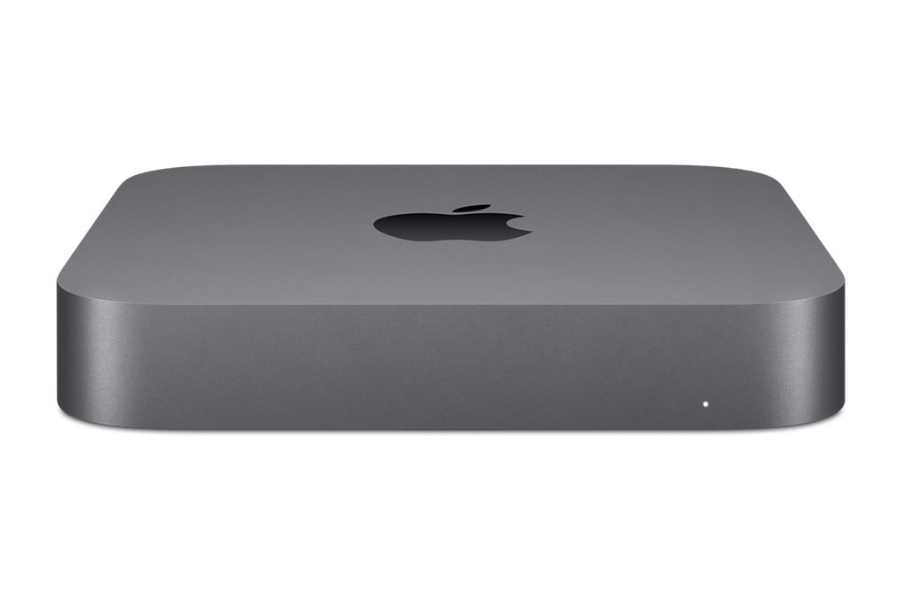
Introduction — Why the Mac Mini 2018 Is Still Tempting in 2026
At first glance, the Mac mini 2018 looks like one of the best bargains in Apple’s lineup in 2026. According to the UpTrade Price Tracker, Certified Used / Refurbished Mac mini 2018 models now start around $120+, which is extremely affordable for a Mac desktop.
It’s easy to see why buyers are still interested:
- Very low entry price for a Mac
- Compact, quiet desktop design
- Upgradeable RAM (unlike Apple Silicon Macs)
- Strong compatibility with legacy Intel software
- A solid reputation as a reliable home or office machine
For users who already have a monitor, keyboard, and mouse, the Mac mini 2018 can look like a cost-effective way to get back into the macOS ecosystem without spending much money.
However, in 2026, price alone doesn’t determine value. The real question isn’t whether the Mac mini 2018 is cheap — it’s whether it still makes sense given Apple’s software roadmap and its shift away from Intel processors.
Important Clarification: “Still Usable” vs “Still Worth Buying”
Let’s clear up an important distinction right away.
Yes — the Mac mini 2018 is still usable in 2026. It powers on, runs apps, connects to the internet, and still receives security updates from Apple. As of the release of this article, its most recent security update arrived in December 2025.
But “still usable” is not the same as “still worth buying.”
What actually matters when buying a Mac in 2026 includes:
- Whether it supports the latest macOS version
- How long Apple will continue providing security updates
- Future app and browser compatibility
- Long-term reliability and resale value
This is where the Mac mini 2018 starts to fall behind. It is the last Mac mini built on Intel chips and does not support macOS 26, Apple’s newest operating system. Instead, it is limited to macOS 15 Sequoia, which immediately puts it in a security-updates-only phase.
In practical terms, that means:
- No access to new macOS features
- A shorter remaining support window
- Faster decline in long-term value
If you already own a Mac mini 2018, it’s reasonable to keep using it for now. But if you’re shopping in 2026, the distinction between “usable” and “worth buying” becomes critical — especially when Apple Silicon alternatives offer far longer support.
macOS Software Support Status of Mac Mini 2018
The biggest factor to consider when evaluating the Mac mini 2018 in 2026 is software support.
The Mac mini 2018 does not support macOS 26. It is limited to macOS 15 Sequoia, which immediately places it one full macOS generation behind Apple’s current operating system.
As of the release of this article:
- Latest macOS supported: macOS 15 Sequoia
- macOS 26 support: No
- Security updates: Yes (most recent update in December 2025)
This means the Mac mini 2018 is now in Apple’s “security updates only” phase.
In this phase:
- New macOS features stop entirely
- Performance and system optimizations end
- Apple continues issuing security patches for a limited time
- App and browser compatibility begins to decline
While security updates help reduce immediate risk, they are temporary by nature. Apple typically supports older macOS versions with security patches for only a few additional years. Once those updates stop, the Mac mini 2018 will officially reach End of Life.
Another important consideration is hardware direction. The Mac mini 2018 is the last Intel-based Mac mini, and Apple has fully transitioned its product lineup to Apple Silicon. As a result, Intel Macs are expected to lose software support sooner than Apple Silicon models, even if they are still technically capable.
In short, the Mac mini 2018 is still supported today — but its remaining software runway is limited. For buyers in 2026, that limited support window is a major reason to think carefully before choosing it over a newer Apple Silicon Mac.
Better Alternative: Mac Mini 2020 (M1) vs Mac Mini 2018
If you’re debating whether to buy the Mac mini 2018 in 2026, it’s important to look at what you get by stepping up to the Mac mini 2020 with Apple’s M1 chip. While the price difference is noticeable, the gap in longevity, software support, and overall value is even bigger.
Below is a clear comparison.
Specs Comparison — Mac Mini 2020 (M1) vs Mac Mini 2018
| Feature | Mac Mini 2018 | Mac Mini 2020 (M1) |
|---|---|---|
| Release Year | 2018 | 2020 |
| Starting Price (Used / Refurbished) | ~$120+ | ~$350+ |
| Processor | Intel Core i3 / i5 / i7 | Apple M1 |
| Architecture | Intel x86 | Apple Silicon (ARM) |
| RAM | Up to 64GB (upgradeable) | Up to 16GB (unified memory) |
| Storage | SSD (user-upgradable on some configs) | SSD (not user-upgradable) |
| Latest macOS Supported | macOS 15 Sequoia | macOS 26 |
| Security Updates in 2026 | Yes (limited window) | Yes (long-term) |
| Software Longevity | Near End of Life | Multiple years remaining |
| Power Efficiency | Moderate | Excellent |
| Noise & Thermals | Runs warmer under load | Cooler and quieter |
Key Differences That Matter in 2026
1. macOS 26 Support vs No Support
The most important difference is software support. The Mac mini 2018 cannot run macOS 26 and is already in the “security updates only” phase. The Mac mini 2020 (M1) fully supports macOS 26 and will continue receiving major macOS updates for years.
This directly affects app compatibility, security, and how long the device stays usable.
2. Apple Silicon Has a Much Longer Support Runway
Apple has fully transitioned its Mac lineup to Apple Silicon. As a result:
- Apple Silicon Macs are prioritized for new features
- Intel Macs are being phased out
- Future macOS releases are increasingly optimized for Apple chips
In 2026, buying an Intel Mac means buying into a platform that Apple is actively moving away from.
3. Performance per Watt Is Dramatically Better on M1
Despite having fewer cores on paper, the M1 chip delivers:
- Faster everyday performance
- Much better efficiency
- Smoother multitasking
- Lower heat and quieter operation
For most users, the Mac mini 2020 (M1) actually feels faster than the Mac mini 2018 — even higher-end Intel configurations.
4. Security and Stability Over Time
The Mac mini 2018 will eventually lose security updates entirely. When that happens, browsers and apps will stop updating, secure websites may block access, and the system becomes risky for daily use.
The Mac mini 2020 (M1) is nowhere near that stage and will remain secure well into the future.
5. Higher Upfront Cost, Much Better Long-Term Value
Yes, the Mac mini 2020 (M1) costs more upfront. But in return, you get:
- Years of additional macOS support
- Better resale value
- Fewer forced upgrades
- A much longer usable lifespan
In contrast, the Mac mini 2018 may need replacing much sooner, wiping out any short-term savings.
Bottom Line
In 2026, the Mac mini 2020 (M1) is not just a faster Mac — it’s a safer, longer-lasting, and smarter investment. The Mac mini 2018 may still be usable today, but the M1 model is the one that will continue to make sense for years to come.
Also Worth Considering: MacBook Air 2020 (M1)
If you’re open to alternatives beyond the Mac mini lineup, the MacBook Air 2020 with Apple’s M1 chip is another option that deserves serious consideration in 2026.
According to the UpTrade Price Tracker, Certified Used / Refurbished MacBook Air 2020 (M1) models have dropped to around $360+, putting them very close in price to the Mac mini 2020 (M1).
At that price point, the value proposition becomes compelling.
Specs — MacBook Air 2020 (M1)
| Feature | MacBook Air 2020 (M1) |
|---|---|
| Release Year | 2020 |
| Starting Price (Used / Refurbished) | ~$360+ |
| Processor | Apple M1 |
| Architecture | Apple Silicon (ARM) |
| RAM | 8GB or 16GB unified memory |
| Storage | SSD (256GB – 2TB options) |
| Display | 13.3-inch Retina (2560×1600) |
| Battery Life (Original Rating) | Up to 18 hours |
| Cooling | Fanless |
| Weight | ~2.8 lbs (1.29 kg) |
| Latest macOS Supported | macOS 26 |
| Software Longevity | Multiple years remaining |
Why the MacBook Air 2020 (M1) Makes Sense in 2026
1. Same Apple Silicon Advantages
The MacBook Air 2020 uses the same M1 chip as the Mac mini 2020, which means full support for macOS 26, long-term software and security updates, excellent performance and efficiency, and strong future app compatibility.
2. Built-In Display, Keyboard, and Battery
Unlike the Mac mini, the MacBook Air includes a high-quality Retina display, a built-in keyboard and trackpad, and an internal battery for portable use.
For buyers who don’t already own a monitor, keyboard, and mouse, this can actually make the MacBook Air a more cost-effective choice overall.
3. Portability Adds Flexibility
Even if you plan to use it primarily at a desk, the ability to work from different rooms, take it on trips, and use it without external accessories adds flexibility that a desktop simply can’t offer.
4. Fanless, Quiet, and Efficient
The MacBook Air M1 is fanless, which means silent operation, no fan noise over time, and excellent battery life even years after release.
This makes it especially appealing for home offices, students, and light-to-moderate professional workloads.
Who Should Consider the MacBook Air M1 Instead of a Mac Mini?
The MacBook Air 2020 (M1) is a great option if:
- You want portability
- You don’t already own a monitor and peripherals
- You want macOS 26 support at a similar price to the M1 Mac mini
- You value flexibility over a fixed desktop setup
In many cases, for just a small premium over a Mac mini 2018 — or close to the price of a Mac mini 2020 (M1) — the MacBook Air M1 can actually be the better overall deal in 2026.
Conclusion — Is Mac Mini 2018 Worth Buying in 2026?
In 2026, the Mac mini 2018 sits in a gray area. It is still usable, still receives security updates (as of December 2025), and looks very attractive at a $120+ Certified Used / Refurbished price.
But usability is not the same as value.
The Mac mini 2018:
- Does not support macOS 26
- Is capped at macOS 15 Sequoia
- Is the last Intel-based Mac mini
- Has a limited remaining software support window
That places it firmly in the “security updates only” phase of Apple’s lifecycle. It’s fine to keep using if you already own one, but buying it in 2026 means accepting a shorter lifespan, faster app compatibility decline, and earlier end-of-life risk.
Recommendations:
If your budget allows, the Mac mini 2020 (M1) is the far better long-term choice. Starting around $350+, it supports macOS 26, benefits from Apple Silicon optimizations, and will remain supported for years longer.
It’s also worth noting that the MacBook Air 2020 (M1) has dropped to around $360+, offering similar longevity with the added benefit of portability, a built-in display, and battery.
FAQ — Buying a Mac Mini 2018 in 2026
1. Are 2018 Mac Minis still supported?
Yes — but only partially. As of the release of this article, the Mac mini 2018 is still receiving security updates from Apple, with the most recent update released in December 2025. However, it no longer receives major macOS upgrades and is approaching End of Life.
2. Does the Mac mini 2018 support macOS 26?
No. The Mac mini 2018 does not support macOS 26. It is capped at macOS 15 Sequoia, which places it one full macOS generation behind Apple’s latest operating system.
3. What is the highest macOS version for Mac mini 2018?
The highest macOS version supported by the Mac mini 2018 is macOS 15 Sequoia.
4. Is the Mac mini 2018 still getting security updates?
Yes. As of the release of this article, the Mac mini 2018 is still receiving security updates. The most recent security update was issued in December 2025. However, Apple may discontinue these updates at any time.
5. Is the Mac mini 2018 safe to use in 2026?
It can be used cautiously as long as security updates continue. Once Apple stops issuing security patches, the Mac mini 2018 will no longer be safe for daily internet-connected use, including browsing, banking, or work-related tasks.
6. Why is the Mac mini 2018 considered “on the edge”?
Because it no longer supports the latest macOS version and is now in Apple’s security-updates-only phase. This phase typically precedes full End of Life, when all updates stop.
7. How much RAM can the 2018 Mac mini handle?
The Mac mini 2018 supports up to 64GB of RAM, which is one of its few remaining advantages over newer Apple Silicon models. The RAM is user-upgradeable, making it appealing for certain legacy or memory-heavy workloads.
8. How long will Apple continue supporting Intel Macs?
Apple has not provided a fixed timeline, but Intel Macs are clearly being phased out faster than Apple Silicon models. Software and security support will end sooner on Intel-based systems like the Mac mini 2018.
9. Is the Mac mini 2020 (M1) worth the price difference?
Yes. The Mac mini 2020 (M1) supports macOS 26, offers significantly better performance and efficiency, and will receive updates for many more years — making it a far better long-term investment.
10. Is the MacBook Air 2020 (M1) a better alternative?
For many users, yes. At around $360+ Certified Used / Refurbished, it offers macOS 26 support, long-term updates, portability, and a built-in display — often making it a better overall value than the Mac mini 2018.
11. What’s the best Mac to buy on a budget in 2026?
If possible, choose an Apple Silicon Mac. The Mac mini 2020 (M1), starting at $350+, and MacBook Air 2020 (M1), starting at $360+, offer the best balance of price, performance, and longevity for budget-conscious buyers in 2026.