Introduction
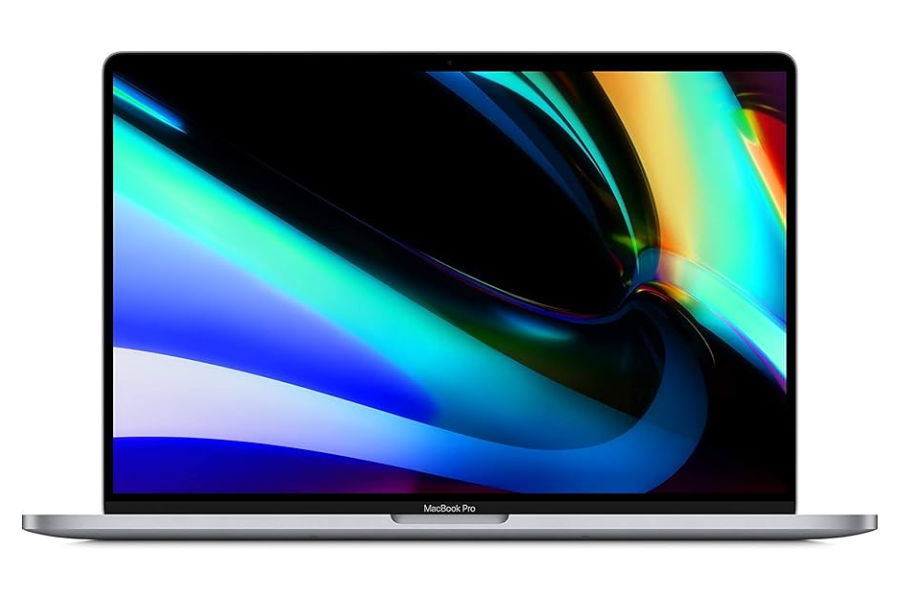
The MacBook Pro 2019 might seem like a steal in 2026—especially with Certified Used and Refurbished models dropping as low as $270+, according to UpTrade’s Price Tracker. At first glance, it's tempting: you're getting a MacBook Pro for less than the cost of a new Chromebook. But before you rush to buy, there’s something important you need to know.
Despite the low price, the 2019 MacBook Pro comes with some serious trade-offs—most notably its unreliable butterfly keyboard, older Intel chip, and nearing end-of-support status. Because it has been excluded from the latest macOS 26, it’s not a good long-term investment. In this blog, we’ll break down the pros and cons of buying the 2019 model today and suggest smarter alternatives.
MacBook Pro 2019 in 2026: Pros and Cons
If you're looking at the 2019 MacBook Pro strictly from a budget perspective, there are a few upsides—but they come with major limitations.
✅ Pros:
- Price: Starting at $270+ for Certified Used / Refurbished
- Retina Display: Bright and sharp screen with good color accuracy.
- Portable Design: Lightweight and compact form factor.
❌ Cons:
- macOS Compatibility: It’s limited to macOS 15 and can’t support macOS 26. (except the 16-inch version)
- Butterfly Keyboard: Known for sticky keys, double-typing, and failure issues—even after repairs.
- Intel Chipset: Older architecture that runs hotter, slower, and less efficiently than Apple Silicon.
- Battery Life: Weaker than M1 models due to Intel thermal inefficiencies.
- Poor Resale Value: Demand is low due to keyboard problems and aging hardware.
In short: while the price is appealing, the MacBook Pro 2019 is quickly aging out of Apple’s ecosystem—and may not be worth the long-term hassle. We also noticed the price last year was the same as this year. In other words, this model has dropped to the minimum price that professional resellers can offer. This model will be phased out soon.
Keyboard Warning: The Butterfly Problem
One of the biggest reasons to avoid the MacBook Pro 2019 in 2026 is the keyboard. Apple used a “butterfly” keyboard mechanism between 2015 and 2019 that became infamous for failure. Keys would stick, double-type, or stop working entirely due to dust or debris. Even after multiple redesigns and repair programs, the problem persisted.
While Apple did eventually replace faulty keyboards for free under its extended keyboard service program, the root problem never went away. That’s why Apple abandoned the butterfly design entirely starting with late-2019 models, switching to the more reliable Magic Keyboard with a scissor-switch mechanism.
Bottom line: If your MacBook is going to be used for school, work, or productivity, the last thing you want is a flaky keyboard. The repair could cost more than the laptop itself.
Performance and Software Support in 2026
The 2019 MacBook Pro uses Intel Core i5 or i7 processors, which were top-of-the-line at the time but now lag behind Apple’s M1 and newer chips in performance, efficiency, and compatibility.
Performance Gaps:
- The M1 chip introduced in late 2020 offers 2x faster CPU and 3x faster GPU in many tasks compared to Intel i5/i7.
- M1-based Macs also have better thermal management, thanks to lower power consumption and smarter architecture.
macOS Support:
- The 2019 MacBook Pro can support up to macOS 15 Sequoia.
- However, it doesn’t support the latest macOS 26 Tahoe, which is for 2026, except for the 16-inch model.
Conclusion: You’re buying into a machine that is not only slower and hotter than newer models, but also has limited time left for software updates—not ideal for a long-term device.
Better Alternative to MacBook Pro 2019
While the Certified Used / Refurbished MacBook Pro 2019 starting at $270+ may look like a great deal, spending a bit more can significantly improve your experience in 2026.
The best alternative is the MacBook Pro 2020 (M1), which starts around $470+ in the refurbished market. Yes, it costs about $200 more, but the upgrade is not incremental — it’s transformational.
You’re not just getting a newer laptop. You’re getting better performance, longer software support, and a much more efficient machine that will last several more years.
Specifications Comparison
| Feature |
MacBook Pro 2019 |
MacBook Pro 2020 (M1) |
| Release Year |
2019 |
2020 |
| Processor |
Intel Core i5 / i7 / i9 |
Apple M1 |
| Display |
13" / 15" Retina |
13" Retina |
| RAM |
8GB – 32GB |
8GB – 16GB |
| Storage |
128GB – 4TB |
256GB – 2TB |
| Keyboard |
Butterfly keyboard |
Magic Keyboard |
| Ports |
Thunderbolt 3 (USB-C) |
Thunderbolt / USB 4 |
| Latest macOS Support |
macOS 15 |
macOS 26 |
| Starting Used Price |
$270+ |
$470+ |
Key Differences
1. Performance: M1 Is Significantly Faster
The MacBook Pro 2020 (M1) delivers a major leap in performance over the Intel-based MacBook Pro 2019.
- Faster app launches
- Smoother multitasking
- Much better performance in creative apps
- Handles modern workloads and AI-based tools more easily
Even compared to higher-end Intel configurations, the M1 often performs better in real-world usage.
2. Battery Life: Nearly 2x Improvement
Battery life is one of the biggest upgrades.
- MacBook Pro 2019: ~6–10 hours real-world
- MacBook Pro M1: up to 15–20 hours
This makes a huge difference for students, professionals, and anyone working on the go.
3. Keyboard Reliability: Major Upgrade
The MacBook Pro 2019 still uses Apple’s butterfly keyboard, which is known for reliability issues.
The M1 MacBook Pro uses the Magic Keyboard, which offers:
- Better typing experience
- Much higher reliability
- Lower long-term repair risk
4. Software Support: Longer Lifespan
The MacBook Pro 2019 is limited to macOS 15, while the M1 model supports macOS 26 and will continue receiving updates for years.
This means:
- Better app compatibility
- Longer usable lifespan
- Higher resale value
5. Efficiency and Thermals: Cooler and Quieter
Thanks to Apple Silicon, the M1 MacBook Pro:
- Runs cooler
- Uses less power
- Stays quieter under load
The Intel MacBook Pro 2019, in contrast, can get warm and rely heavily on fans during intensive tasks.
Why Not MacBook Pro 2020 (Intel)?
At first glance, the MacBook Pro 2020 (Intel) might seem like a reasonable upgrade from the 2019 model. After all, it’s newer and often priced below the M1 version.
However, in 2026, we generally do not recommend the Intel version of the MacBook Pro 2020 — and here’s why.
Confusing Variants: Not All Intel Models Are Equal
Apple actually released two different Intel versions of the MacBook Pro 2020:
Entry-Level Model (2 Thunderbolt Ports)
- 8th-generation Intel Core i5 / i7
- 2133MHz LPDDR3 RAM
- Does NOT support macOS 26
Higher-End Model (4 Thunderbolt Ports)
- 10th-generation Intel Core i5 / i7
- Faster memory
- Supports macOS 26
The Problem: Hard to Identify When Buying Refurbished
In the Used / Refurbished market, these two models are often:
- Listed under the same name
- Poorly labeled by sellers
- Missing key specs (ports, processor generation)
This creates a real risk:
👉 You might accidentally buy the entry-level model, which is already outdated and does not support macOS 26
Availability Issue: The Good One Is Rare
Based on our experience:
- The higher-end (4-port) Intel model is much harder to find
- Most listings online are for the entry-level (2-port) version
Even when the higher-end model is available:
- It’s usually priced close to the M1 version
- The value advantage becomes minimal
Key Takeaway
The MacBook Pro 2020 (Intel) is not a terrible device — but it’s a confusing and risky choice in the refurbished market.
- The wrong version may not support macOS 26
- The right version is hard to find
- The price gap vs M1 is small
👉 Instead of trying to navigate these uncertainties, it’s simply easier and smarter to go with the MacBook Pro 2020 (M1). For most buyers in 2026, the M1 version is the clear and safer choice.
Conclusion — Is the MacBook Pro 2019 Worth Buying in 2026?
No. At first glance, the Certified Used / Refurbished MacBook Pro 2019 starting at $270+ looks like a great deal. For under $300, you’re getting a premium MacBook Pro with a Retina display and solid performance for everyday tasks.
However, in 2026, the MacBook Pro 2019 sits in an awkward position — not old enough to be ultra-cheap, but not new enough to be a smart long-term investment.
The biggest concerns are:
- Limited software support (no macOS 26)
- Butterfly keyboard reliability issues
- Aging Intel performance compared to newer Apple Silicon Macs
While it may still handle basic tasks today, its remaining lifespan is limited, and its long-term value is weak.
More importantly, the alternatives are simply too compelling to ignore.
For around $470+, the MacBook Pro 2020 (M1) delivers:
- Significantly better performance
- Much longer battery life
- Longer software support
- Better overall reliability
Yes, it costs about $200 more, but the difference in real-world experience and longevity is substantial.
Final Words
- The MacBook Pro 2019 is not recommended in 2026
- The MacBook Pro 2020 (M1) is the best alternative and worth the extra cost
👉 If your budget allows, skip the 2019 model and go straight to the M1 MacBook Pro — it’s the smarter and more future-proof investment.
FAQ — Buying the MacBook Pro 2019 in 2026
1. Is the MacBook Pro 2019 still supported in 2026?
Partially. The MacBook Pro 2019 is limited to macOS 15 and does not support macOS 26. While it may still receive some security updates, it has already reached the end of its major upgrade cycle.
2. Is $270 a good price for a refurbished MacBook Pro 2019?
Yes, $270+ is an attractive price, but it comes with trade-offs. Because of limited software support, keyboard reliability concerns, and aging hardware, many buyers will find better long-term value by spending more on a newer MacBook.
3. Is the MacBook Pro 2019 butterfly keyboard reliable?
No. The MacBook Pro 2019 uses Apple’s butterfly keyboard, which is known for issues such as stuck keys, double typing, and unresponsive keys. Apple discontinued this design and replaced it with the Magic Keyboard in newer models.
4. Is the MacBook Pro 2019 still fast enough in 2026?
For basic tasks like web browsing, email, and office work, the MacBook Pro 2019 is still usable. However, it falls behind significantly in multitasking, creative work, and modern applications compared to newer Macs — especially those with Apple’s M1 chip.
5. What is the best alternative to the MacBook Pro 2019?
The best alternative is the MacBook Pro 2020 (M1), starting around $470+ in the refurbished market. It offers much better performance, battery life, and longer software support.
6. Why not choose the MacBook Pro 2020 (Intel)?
The MacBook Pro 2020 (Intel) comes in two versions, and only the higher-end model supports macOS 26. These versions are often hard to distinguish in the refurbished market, making it a risky purchase. In addition, pricing is often close to the M1 version, making the M1 a better and simpler choice.
7. Is the MacBook Pro 2020 (M1) worth the extra cost?
Yes. Although it costs about $200 more, the M1 MacBook Pro delivers significantly better performance, much longer battery life, and a longer software lifespan — making it a far better investment in 2026.
8. Does the MacBook Pro 2019 support the latest macOS?
No. The MacBook Pro 2019 does not support macOS 26 and is limited to macOS 15.
9. Can I still get keyboard repairs on a 2019 MacBook Pro?
Possibly. Apple’s Keyboard Service Program still covers many 2015–2019 models, but warranty coverage may be very limited in 2026. It’s best to check with Apple using the serial number before purchasing.
10. Why does macOS jump from macOS 15 to macOS 26?
Apple has moved to a year-based naming system for macOS to align with iOS and iPadOS. macOS 26 corresponds to the 2026 generation and was released in late 2025.

 Sale
Sale